Audio Evolution Mobile Studio
- 4.3
- Rating
- 100.00K
- Installs
- $11.99
- Price

 Analysis by App-foxy
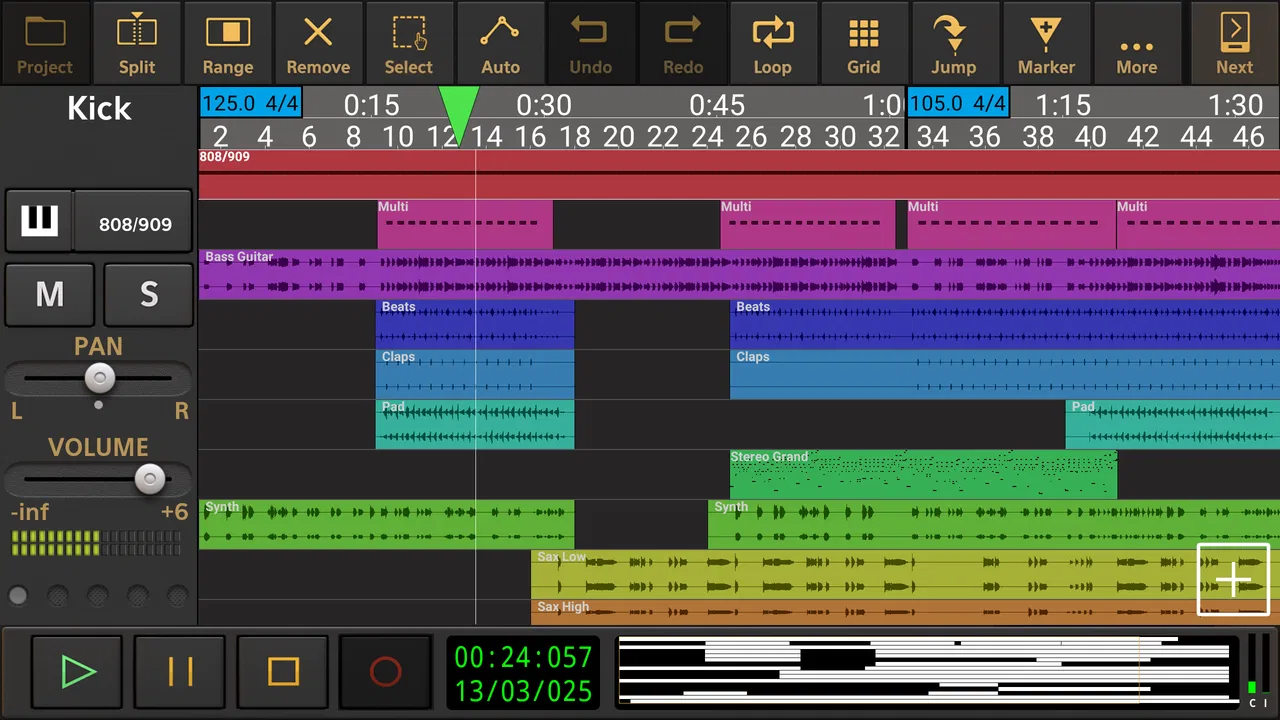
Making music on a phone sounds convenient until the first real recording session exposes the limits of mobile hardware, cables, storage, and attention. After spending time with Audio Evolution Mobile Studio, I see it as a serious multitrack workspace rather than a simple voice recorder or beat-making toy. It is designed for people who want to connect instruments, microphones, or MIDI equipment and keep a project moving without sitting in front of a desktop computer.
The app comes from eXtream Software Development and sits in the Music & Audio category. Its central appeal is straightforward: it brings recording, arranging, editing, and mixing tools into a touch-based environment. That sounds like a lot to fit into a phone, and the experience does involve compromises, but the underlying workflow is much more capable than the usual “press record and save a memo” approach.
I would recommend it most readily to musicians who already understand basic recording concepts. Beginners can learn their way around it, but the app does not always feel like it is trying to hide the complexity of a studio. That is partly its strength. You get room to build a proper project, but you also need to think about signal paths, input selection, monitoring, track organization, and how your connected equipment behaves.
You May Also Like

 Pandora - Music & Podcasts
Pandora’s Music Is Easy to Start, but Harder to Recover
Pandora’s strength is its low-effort path from a seed to a station. Its weak spot is how much confidence it asks you to place in connection, setup, and quiet recovery.

 8 Ball Pool
 Is Built on Rivalries, Rematches, and Routine
A close look at the rivalries, rematches, shared routines, and unanswered safety questions that turn a quick pool match into a persistent mobile community.

 Samsung Music
’s Quiet Strength Is Playing What You Already Own
Its reach comes less from spectacle than from dependable access to a personal library. That simplicity is both the app’s strongest retention engine and its ceiling.

 AccuWeather: Weather Radar
AccuWeather Review: A Quick, Clear Forecast for Everyday Decisions
For everyday plans, the best forecast is the one you can understand quickly. AccuWeather makes rain timing, radar, and local conditions easy to act on, with a few trade-offs.

 Hill Climb Racing
Why Hill Climb Racing Still Turns Crashes Into One More Run
A tiny car, a bumpy hill and one more upgrade: Hill Climb Racing keeps resurfacing because its simple chaos makes every near-miss feel personal.

 AliExpress - Shopping App
AliExpress Makes Global Shopping Feel Personal, but Shoppers Bear the Risk
AliExpress turns a global marketplace into a pocket-sized discovery engine. Its reach is useful, its shopping loop compelling, and its trade-offs easy to miss.
More From Our News Desk
View All News


Connectivity decides how useful the studio feels
The most important part of this app is not simply the screen interface. It is the connection between the mobile device and the equipment around it. USB audio and MIDI support make the phone more than a passive recorder: with compatible gear, it can become the center of a small recording setup. That changes the experience completely compared with using the built-in microphone and tapping out ideas with fingers.
In practice, I found it helpful to think of the app as the software half of a portable studio. The phone or tablet provides the project view, editing tools, and mixer, while the external microphone, audio interface, keyboard, or controller determines much of the recording quality and comfort. A good app cannot repair a noisy input, an unreliable cable, or a device that does not behave well with the mobile hardware.
This is also where expectations need to stay realistic. USB audio and MIDI are valuable because they open the door to proper instruments and controllers, but they add setup decisions. Before an important session, I would connect everything early, check that the intended input is selected, and make a short test recording. That small habit is more useful than assuming the first connection will behave exactly as expected.
Connectivity can matter even when the actual creative work is happening on the device. A recording project may depend on a stable physical chain: the instrument into the interface, the interface into the phone, headphones into the monitoring path, and MIDI equipment connected in the right order. If one link is wrong, the app may appear ready while the recorded result is silent, distorted, or coming from an unintended source.
Why external gear changes the workflow
With a built-in microphone, Audio Evolution Mobile Studio is convenient for sketches, spoken ideas, rehearsals, and quick acoustic takes. The moment I moved toward layered music, though, an external connection became much more important. A dedicated interface gives you a clearer way to record a guitar, keyboard, microphone, or other source, while MIDI connection makes it easier to work with a controller instead of drawing every note by hand.
That flexibility is one of the app’s less obvious strengths. It can support different creative habits rather than forcing every user into the same production style. A singer can capture a vocal over a backing track, a guitarist can record several passes, and a keyboard player can build an arrangement with MIDI. The best workflow depends on the equipment, but the app is broad enough to accommodate those different starting points.
There is a trade-off, however. A simple mobile music app usually wins when the goal is instant gratification. You open it, choose a sound, and start making something. This app asks more from you because it behaves more like a compact studio. That extra control is worthwhile for recording musicians, but it can feel excessive if you only want to hum a melody or trim a short audio clip.
Using it away from the desk
The app makes the most sense in mobile situations where a laptop would be inconvenient. I can imagine taking a small setup to a rehearsal, recording a guitar part in a quiet room, capturing a musical idea immediately after it appears, or building a rough arrangement while traveling. The advantage is not that a phone magically replaces a full studio; it is that the project can follow you into places where a desktop setup would be awkward.
A realistic everyday scenario would be a songwriter who has a chorus ready but no finished arrangement. They could connect a microphone or instrument, record a guide part, add another layer, and use the project as a working sketch rather than waiting until they return home. That changes the app from a last-minute recorder into a way of protecting creative momentum.
For rehearsal, I would use it with a clear plan. Create or open the project before the group starts, check the input routing, make a brief test, and keep the phone stable. Touch controls are useful for quick edits, but they are not as forgiving as a large desktop display when several people are waiting. Preparation matters more on mobile because the screen gives you less room to see every detail at once.
Headphones are especially important for overdubbing. Monitoring through a speaker while recording a microphone can create unwanted spill or make it harder to judge the take. The app gives you a studio-style environment, but the physical recording conditions still determine whether that environment produces a clean result. In other words, the mobile format improves portability, not the laws of acoustics.
Editing and arranging with a small screen
Touch editing feels natural for broad tasks such as selecting a region, moving material, and navigating around a project. It is less comfortable when the arrangement becomes crowded or when I need to make very precise changes. Zooming and checking the exact position of an edit becomes part of the routine, especially when several tracks are stacked together.
My practical advice is to keep projects organized from the beginning. Name tracks according to their role, separate guide material from final takes, and avoid recording multiple ideas onto an unlabelled track. On a desktop, messy projects are annoying; on a phone, they become harder to inspect because the interface cannot show everything simultaneously. Good organization is not cosmetic here. It directly reduces mistakes.
Another useful habit is to save versions of an arrangement before making a major change. Mobile editing encourages experimentation because the device is always nearby, but a touch gesture can produce a result that is difficult to reconstruct. Keeping a clean earlier version gives you freedom to try a different edit without turning the project into a guessing game.
When a connection fails
Any mobile recording setup has moments when the technology interrupts the music. An interface may not be recognized as expected, a MIDI controller may fail to respond, monitoring may be routed incorrectly, or the phone may simply be occupied with another task. I would not treat these moments as a reason to reject the app, but I would treat them as part of the ownership experience.
The best recovery method is systematic rather than dramatic. Stop the session, check the physical connection, confirm the selected input and output, and make a short test before recording again. If the problem appeared after changing equipment, return to the last known working arrangement instead of changing several things at once. That makes it easier to identify whether the issue is the cable, the device, the project configuration, or the connected hardware.
Short test recordings are particularly valuable because a project can look perfectly normal while capturing the wrong signal. I prefer to record a few seconds, play it back, and listen with headphones before asking anyone to perform a full take. This is a small professional habit, but it prevents the most frustrating kind of failure: discovering after the session that the performance was never captured correctly.
Recovery also means protecting your creative work from unnecessary complexity. If a session is important, I would avoid experimenting with unfamiliar routing or new equipment five minutes before recording. Use a simple configuration first, confirm that it works, and only then add another layer of complexity. The app offers enough depth to reward experimentation, but important recordings deserve a conservative setup.
Being careful with data and battery
Music projects can become large because they contain multiple takes and layers, so storage deserves attention even when the app itself feels compact. I would regularly review unused takes and old versions, especially after recording a rehearsal where many attempts may accumulate. Keeping only the material that still serves the project makes navigation easier and reduces the chance of running out of room at an inconvenient moment.
Connectivity also affects how I plan a session from a data-conscious perspective. If I am going somewhere with limited access to downloads or account services, I would prepare the project and any required equipment beforehand rather than assuming every part of the workflow can be handled at the last minute. The safest approach is to treat a mobile recording session like a small field job: prepare the tools, confirm the setup, and leave enough time for testing.
Battery planning matters just as much. Recording, monitoring, screen use, and connected hardware can make a long session more demanding than casually listening to music. I would start with a well-charged device, carry the appropriate power solution, and avoid leaving the screen active unnecessarily between takes. These are ordinary precautions, but they make the difference between a productive portable session and one that ends early.
I also recommend separating creative decisions from technical housekeeping. First capture the performance while the setup is working; then spend time trimming, arranging, and refining. Constantly changing cables or settings in the middle of an inspired take increases the chance of losing focus. The app can support both recording and editing, but the mobile environment rewards a clear division between those two modes.
Who will appreciate the depth
Audio Evolution Mobile Studio is a strong match for musicians who want more than a single-track memo. It suits people recording vocals and instruments, arranging layered ideas, working with MIDI, or carrying a modest studio workflow into a rehearsal room. It is also appealing to users who understand why an external interface or controller can be more useful than relying on a phone’s built-in input.
The app’s long presence in the category helps explain why it feels like a developed recording tool rather than a novelty. It was released in March 2012, and the current version is 5.5.7.6. I would still judge it by the present experience rather than its age, but that history is relevant: this is an established type of mobile studio, not an experiment that only recently appeared.
Its store rating is a 4.3 average from around ten thousand ratings, with roughly two thousand written reviews and over one hundred thousand installs. Those figures suggest a meaningful audience, but they should not replace a personal fit check. A well-regarded recording app can still be the wrong choice for someone who wants a very simple interface or who has no interest in connecting music equipment.
The Everyone content rating makes it broadly approachable from an age-rating perspective. The more important question is skill level. A curious beginner can use it, but someone who has never encountered tracks, inputs, MIDI, or monitoring may need patience. I would start with one instrument and one short project, learn the recording path, and only then explore more elaborate arrangements.
Where another app may be better
If your priority is instant beat creation, loop-based play, or a visually guided beginner experience, a simpler music-making app may feel more welcoming. Those alternatives often reduce the number of decisions between opening the app and hearing a result. Audio Evolution Mobile Studio is more attractive when the recording itself matters and when you want control over how parts enter the project.
A desktop digital audio workstation remains the better choice for long sessions, very large arrangements, detailed mixing, or work that depends on a wide screen and many simultaneous controls. I would not choose this mobile studio as a universal replacement for a computer. Its value is different: it gives you a capable portable environment and a way to continue working when the full desk is unavailable.
The price is $11.99, with optional in-app purchases ranging from $1.14 to $17.99 per item. That makes the buying decision worth considering before installation. For someone who will record regularly, the cost can make sense because the app’s usefulness comes from its studio workflow rather than a single novelty feature. For occasional voice notes, it would be difficult to justify paying for this level of production depth when a basic recorder would be quicker.
My final view on the connected studio
What I like most is that the app takes mobile recording seriously without pretending that the phone is the entire studio. USB audio and MIDI connections give it a practical role in a musician’s setup, while the multitrack approach makes it suitable for developing ideas beyond a single rough take. The strongest results come when the user is willing to prepare the equipment and keep the project organized.
What I like least is the friction that appears whenever the setup becomes complicated. Small screens make dense arrangements harder to manage, and connectivity problems can interrupt the creative flow. Those issues are not unique to this app, but they matter more when the main reason for choosing mobile software is convenience. If you want effortless recording with almost no decisions, this is probably too involved.
For me, the connectivity verdict is positive but conditional: the app earns its place when portable recording needs real external equipment and a proper project workflow. It is not merely a pocket voice recorder, and it is not a full desktop replacement. It is best understood as a mobile control room for musicians who value access, flexibility, and the ability to turn a connected instrument into an organized recording session.
If that describes you, I would begin with a small test project, one input, and a short recording. Confirm the connection, listen back carefully, and learn the editing gestures before building a larger arrangement. That approach reveals the app’s strengths without burying you in setup work. For a musician who wants to capture, shape, and carry serious ideas, Audio Evolution Mobile Studio is a convincing option, provided its extra control is something you actually plan to use.
FAQs for Audio Evolution Mobile Studio
01What is Audio Evolution Mobile Studio, and who is it designed for?
Audio Evolution Mobile Studio is a mobile digital audio workstation for Android and iOS that lets you record, edit, arrange, and mix music directly on a phone or tablet. It is aimed at musicians, singers, podcasters, and producers who need portable recording tools. The app offers a more advanced workflow than a basic voice recorder, although beginners may need time to learn its interface.
02Can I record vocals and instruments with Audio Evolution Mobile Studio?
Yes. Audio Evolution Mobile Studio supports multitrack recording, allowing you to capture vocals, guitars, keyboards, and other instruments while building a project layer by layer. Compatible devices and adapters can be used for microphones or instruments, while supported audio interfaces may provide better sound quality and lower latency. Your results will depend on the device, microphone, interface, and recording settings.
03Does Audio Evolution Mobile Studio include effects, virtual instruments, and editing tools?
The app includes a broad selection of tools for arranging and polishing recordings, such as waveform editing, MIDI sequencing, mixing controls, automation, and audio effects. Depending on the platform and installed content, users may also access virtual instruments, drum sounds, synthesizers, and additional effect packages. Some features or sound libraries may require separate purchases, so checking the current in-app store is recommended.
04Can I use Audio Evolution Mobile Studio without an internet connection?
Many core activities, including recording, editing, arranging, and mixing projects, can generally be performed offline once the application and any required content have been installed. Internet access may still be needed for downloading the app, activating purchases, obtaining optional instruments or effects, and checking updates. Before working away from home, it is wise to open the project and confirm that all required sounds and plug-ins are available locally.
05Is Audio Evolution Mobile Studio suitable for professional music production?
Audio Evolution Mobile Studio can be suitable for serious songwriting, demos, rehearsals, podcast production, and even complete mobile projects, particularly when paired with a good audio interface and headphones. It provides considerably more control than most mobile recording apps. However, desktop workstations may still offer larger project workflows, broader plug-in compatibility, and more comfortable editing for complex professional sessions.
Pros
- Powerful multitrack recording and editing tools for mobile devices.
- Supports USB audio interfaces and external MIDI hardware.
- Wide range of effects
- instruments
- and audio processing options.
- Precise waveform editing with useful automation capabilities.
- Projects can be exported in several common audio formats.
Cons
- Many advanced features require separate in-app purchases.
- The interface can feel overwhelming for beginners.
- Performance depends heavily on the device and audio hardware.
- Some plugins and instruments may consume significant storage.
- Mobile mixing is less comfortable on small phone screens.

Audio Evolution Mobile Studio
Gallery